What is UBI?
What this page covers: What UBI is, why it exists on Zephyr, what it provides, what it deliberately leaves out, and when to use it (or not).
Prerequisites: None. This is the recommended first read.
After reading this: You will be able to decide whether UBI is the right fit for your project. For the runtime model and lifecycle terminology, continue to Concepts at a Glance.
In one paragraph
UBI (Unsorted Block Images) is a thin volume management layer for raw flash on Zephyr RTOS. It maps Logical Erase Blocks (LEBs) to Physical Erase Blocks (PEBs), spreads writes across the partition for wear-leveling, isolates bad blocks transparently, and partitions a single flash region into multiple named logical volumes — each independently readable, writable, and (for dynamic volumes) resizable. UBI is analogous to LVM in Linux, but operates on erase blocks instead of sectors. It is not a filesystem.
Where UBI sits in the stack
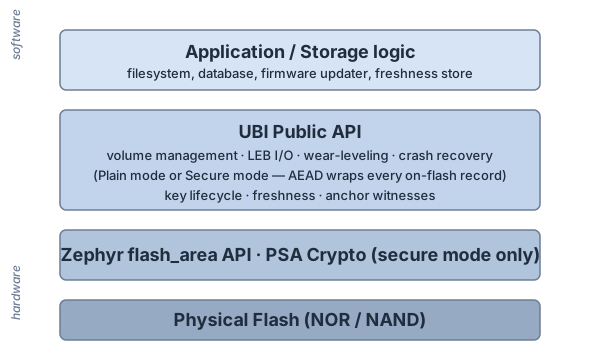
UBI consumes a single Zephyr flash partition and exposes multiple logical volumes to the application. The application never touches the flash hardware directly.
Why UBI on Zephyr?
Zephyr provides several flash abstractions, but none offer a general-purpose volume manager with wear-leveling for raw flash:
Existing solution |
What it does |
What it lacks |
|---|---|---|
Flash Map ( |
Named partitions on fixed flash regions |
No wear-leveling, no volumes, static layout |
NVS |
Key-value store with wear-leveling |
Single key-value namespace, not a volume manager |
ZMS |
Zephyr Memory Storage — newer KV store |
Same model as NVS; no raw-block volumes |
LittleFS |
Filesystem with wear-leveling |
File-grained, heavier footprint, no raw block access |
FCB |
Flash circular buffer |
Append-only, no random-access volumes |
UBI fills this gap as a thin, low-overhead volume manager.
Features
Multiple named logical volumes on a single flash partition.
Global wear-leveling across the entire partition (not per-volume).
Transparent bad-block detection and isolation.
Dynamic volumes can be created, removed, and resized at runtime; static volumes have fixed content.
Dual-bank metadata headers for crash resilience (configurable 2–4 reserved PEB copies).
Crash recovery via sequence-number-based conflict resolution.
Thread-safe operations via per-device Zephyr mutex.
Static or heap memory backend — runtime RAM can be fully determined at compile time.
Optional authenticated encryption of all on-flash structures (
CONFIG_UBI_SECURE, AES-128-CCM via PSA Crypto). See Secure Architecture: Overview for the developer-facing summary.
Non-goals
UBI intentionally does not provide:
Non-goal |
Rationale |
|---|---|
Filesystem (files, directories, POSIX API) |
UBI is a block-level volume manager. Use LittleFS or FAT on top if you need a filesystem. |
FTL replacement for eMMC / SD |
Managed flash has its own translation layer. UBI adds no value. |
Power-loss atomicity for user data |
UBI protects metadata (dual-bank + sqnum). User-data writes are not journaled — a power loss mid-write may leave a LEB partially written. |
Per-record authenticated encryption (in plain mode) |
Available as an opt-in via |
When to use UBI
Use UBI when you have:
Raw NOR or NAND flash that you control directly via Zephyr’s flash driver (not eMMC, SD, or other managed flash).
A single partition you want to share between multiple consumers (e.g., A/B firmware images plus a configuration blob).
A need for wear-leveling that NVS / ZMS cannot satisfy because your records are large or block-shaped.
A target where predictable RAM cost matters more than a filesystem’s feature set.
When not to use UBI
Look elsewhere when:
You only need a key-value store — use NVS or ZMS.
You only need files and directories — use LittleFS on top of UBI, or directly on a flash partition for the simplest case.
Your storage is managed flash (eMMC, SD card) — UBI duplicates the FTL that the device already provides.
You need power-loss atomicity for user data: UBI only journals metadata. Wrap user-data writes in a higher-level transaction, or use a filesystem with full data journaling.
For a fuller side-by-side, see Comparison: UBI vs LittleFS vs NVS vs ZMS.
What’s next
Concepts at a Glance — five key concepts (PEB, LEB, EC, VID, EBA) and how UBI works in six steps.
Quick Start — build, flash, write, read in 5 minutes.
Architecture Guide — on-flash layout, header formats, in-RAM structures, and resource usage.
Secure Architecture: Overview — what Secure UBI adds and when to enable it.